Wishlists
How to create and share your wishlist
Add items to My Wishlist and privately invite a registered friend or family member. Purchases can be coordinated without spoiling your surprise.
Step by step
Open My Wishlist and add any items you would like.
Tap Share to open Share your Personal Wishlist.
Read the invitation rules. Both people must have registered accounts, and each new link can be used by one account.
Choose Create single-use link, then send it privately to the intended person. An unused invitation expires after 12 hours.
People you invite can mark something as bought in Little Gift List. You do not see who bought it; other authorised viewers can avoid duplicates.
Review and revoke someone’s wishlist access through the sharing panel if needed.
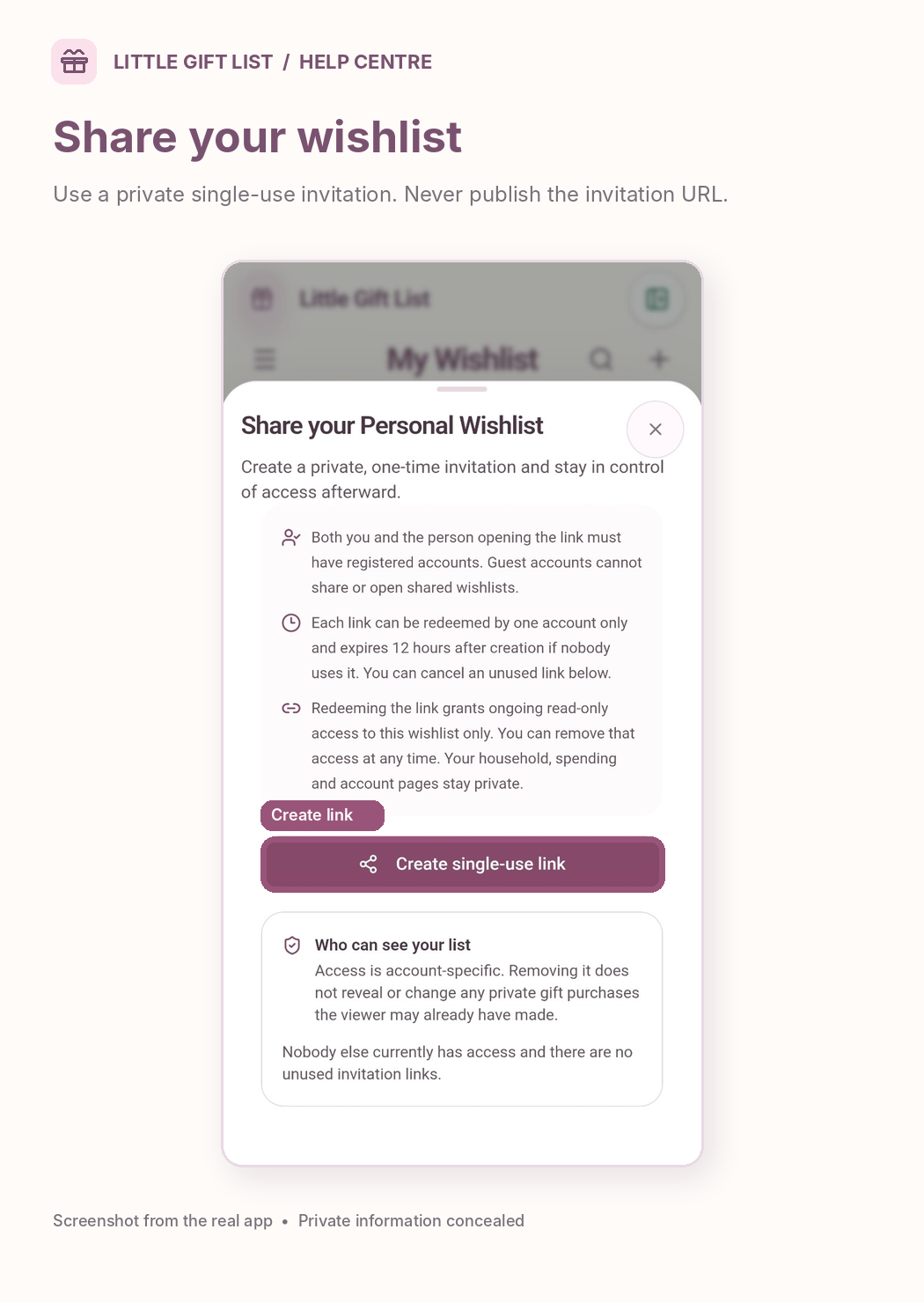
What you should see
The sharing panel shows whether an invitation is unused or who has access. You will not see who has bought a gift.
If it doesn't work
Help tip 1
Visiting or buying on the retailer website alone does not mark a gift as bought in Little Gift List.
Help tip 2
Never post a private invitation link publicly.
Help tip 3
A person invited to the wishlist does not automatically gain access to household or account information.
Ready to try it?
Open My WishlistPrivate planning pages may ask you to sign in or use your existing guest session.
Still need a hand?
Tell us what you were trying to do. You can send a support request without signing in.
Contact support